Want to easily and fast download videos on Youtube Clip.dj is a free service that allows you to download videos on Youtube in MP3 and MP4 format, by converting it online.

Showing posts with label youtube. Show all posts
Showing posts with label youtube. Show all posts
Thursday, July 14, 2011
Thursday, April 7, 2011
Watch DLF IPL 4 T20 2011 Cricket Using Live Streaming
If you are in India, you can watch the IPL matches live on Set Max channel.We know how hard it is to watch Indian Premier League 2011 in TV these days when you are in office or attending your class. Don’t worry, if you have internet and a screen, you have your own online TV and you won’t miss any action.This season of IPL has 2 new teams which makes the number of teams to 10.
Sunday, March 27, 2011
YouTube Downloader HQ Pro Download Multiple Youtube High Quality Video At same Time
YouTube Downloader HQ Pro is very small handy application. YouTube Downloader HQ Pro using advanced download technology allows you download YouTube videos faster.

Thursday, February 3, 2011
Free FLV Converter – An Easy To Use Youtube Video To mp4 Converter
webmsoft released a free flv to MP4 Converter . Free FLV to MP4 Converter is a a simple utility and easy to use converter. It is a perfect FLV to MP4 converter that can convert FLV to MP4 files completely. The program works very fast and has a straightforward interface. Just drag and drop FLV video files into the application and click the Convert to MP4 button.
Monday, January 17, 2011
Android - Browse Apps Without Any borders
The mobile operating system Android by Google is getting more and more popular these days.And I am sure that everyone is wishing to have one Android smart phone for them.Android, applications can Many integrate features.This feature is entitled Applications Without Boarders.

Friday, September 10, 2010
Free Download YouTube Music Downloader With Registration Code

Friday, August 13, 2010
Freemake Video Downloader - Download Videos in Two Clicks !
Freemake Video Downloader, a new freeware released by Freemake com, allows users to download their favorite videos in 4K YouTube quality. This is a totally free video downloader which supports numerous websites and formats.

Monday, June 28, 2010
Download Multiple YouTube Videos using Bulk YouTube Video Downloader.
How many YouTube video downloaders that have been around on the web lately? If you often download videos hosted in YouTube, I’m sure you have known at least several downloaders already. But what if we want to download multiple videos within a single web page from the browser itself? well, for firefox users this can be easily done with BYtubeD or Bulk YouTube Video Downloader.
Sunday, June 27, 2010
Download Any Video or Extract Any Audio From YouTube With One Easy Click
 one click you can download any YouTube video or extract any audio from a YouTube Video. Just think if you have a favorite Musical video and you would love that song on your MP-3 player now you can do that. One click and you can download the audio of that Youtube.
Sunday, June 20, 2010
How to set a youtube video to start at a certain point

Add the following tag to the end of the link "#t=1m20s" where "m" = the minutes and "s" = the seconds, for example heres a video that is 1 minute and 45 seconds long, I only want to show the part that begins at 1 minute and 19 seconds till the end.
Sunday, June 13, 2010
Automatically Share Your Youtube Video On Orkut, Twitter or Facebook
youtube added to the new feature, where you can link all your youtube account to your orkut account to share your youtube activity among your friends. Your youtube activity includes favoriting, rating, or uploading a video.
You can select what activity would you like to share with your orkut, twitter or facebook friends. Follow the procedure to know how to do this.
1. Go to youtube.com and login to your youtube account
2. Go to Settings >> Activity Sharing as shown in the image below.
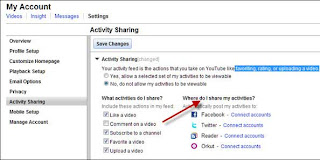
You can select what activity would you like to share with your orkut, twitter or facebook friends. Follow the procedure to know how to do this.
1. Go to youtube.com and login to your youtube account
2. Go to Settings >> Activity Sharing as shown in the image below.

Tuesday, June 8, 2010
Remove In-Video ads and comments from YouTube Videos
When you watch videos and clips on YouTube, some unlike annotations and ads are pop-up between them so each time you have to close or disable them. When you open multiple videos into multiple tabs, this task become annoying and boring. Here is one useful plugin which can avoid them very easily – YouTube Options YouTube Options is a Google chrome plugin that helps users to disable in-video ads, annotations, comments, right sidebar, video descriptions and footers from the Videos in YouTube.
Subscribe to:
Posts (Atom)